The Command Center

See whatworks.

Every client gets the dashboard we work from. Live tracking, a read out of your site, the project board, and a direct line to the team. If we did it, you can see it.

Client login
Command Center

Round 1 / The answer

Everynumber.Everytask.Everyconversation.Onelogin,andnothinghiddenbehindamonthlyPDF.

Round 2 / Why you need it

Because you are paying for marketing you cannot see.

  • Results show up in a PDF weeks after the month ends.

    Results are on screen this morning, and again after lunch.

  • Half your ad budget works. Nobody can say which half.

    Every sale is tied to the ad, email, or search that earned it.

  • You ask what we did this week and wait for a reply.

    Every task, owner, and due date is open to you, bad news included.

  • Your website has problems nobody has told you about.

    We read your site and do the fixes worth doing first.

  • Ads, store, email, and analytics live in five logins.

    They land in one place, next to the people running them.

Round 3 / Questions, answered

The questions you ask, answered on screen.

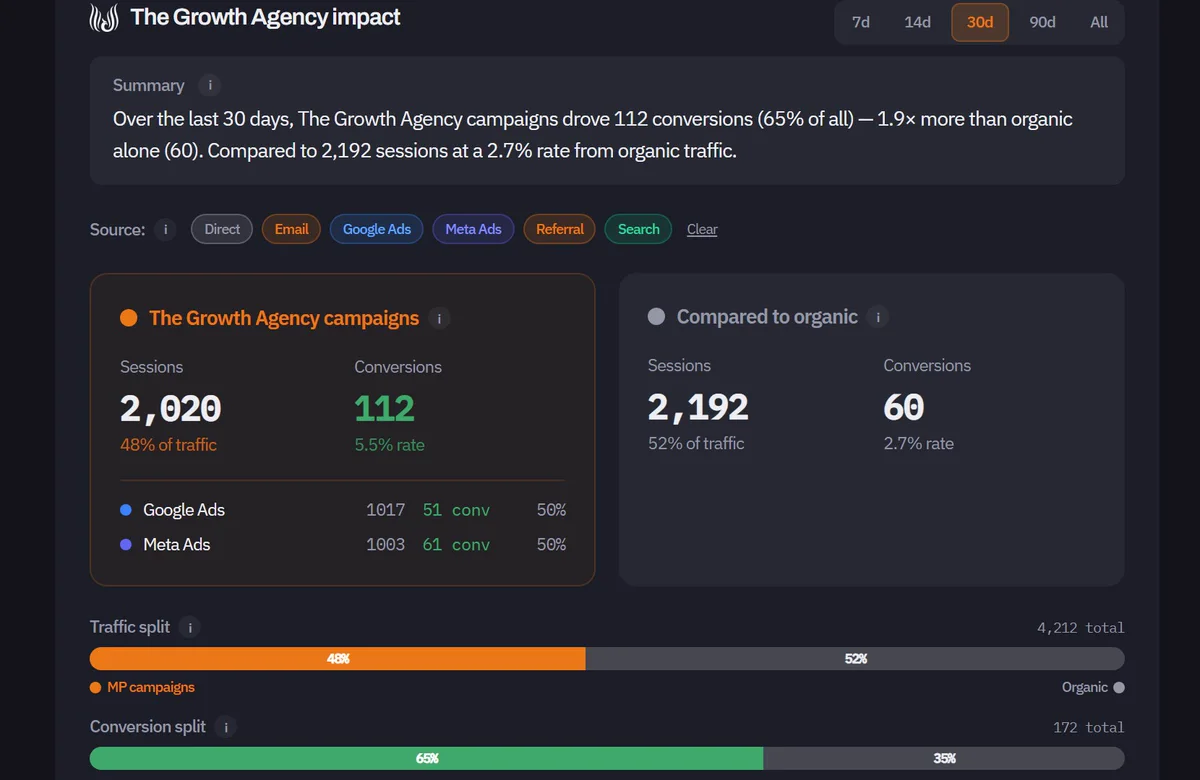
The impact summary and the campaigns versus organic panel of the dashboard

You ask

“Is my ad spend working?”

Know if your ads are paying off.

Open the dashboard and see what our campaigns drove next to what came in on its own. No logging into five ad platforms, no waiting for month end.

Why you need itMove budget toward the ads that sell, this week, not next quarter.

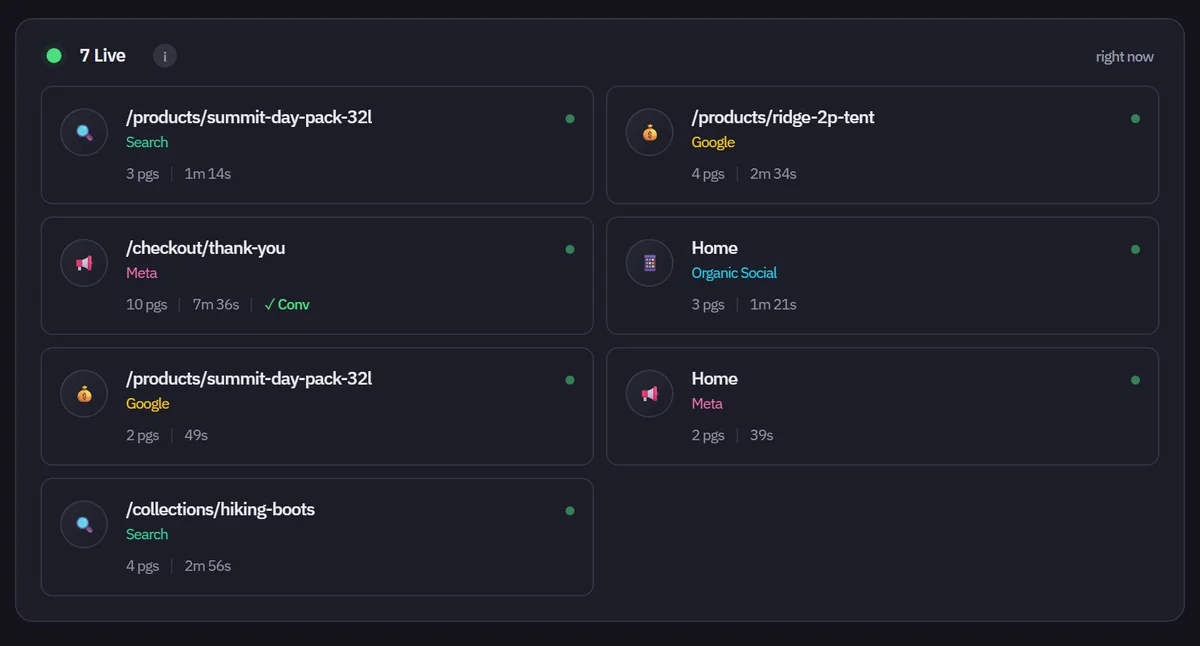
The live visitors panel, showing who is on the site right now and where each came from

You ask

“What is happening on my site right now?”

See a sale the moment it happens.

Who is on your site this second, which channel sent them, and whether the visit ended in a purchase. Every visit is tied back to the ad or email that earned it.

Why you need itCatch a spike, a dip, or a broken checkout while it is still happening.

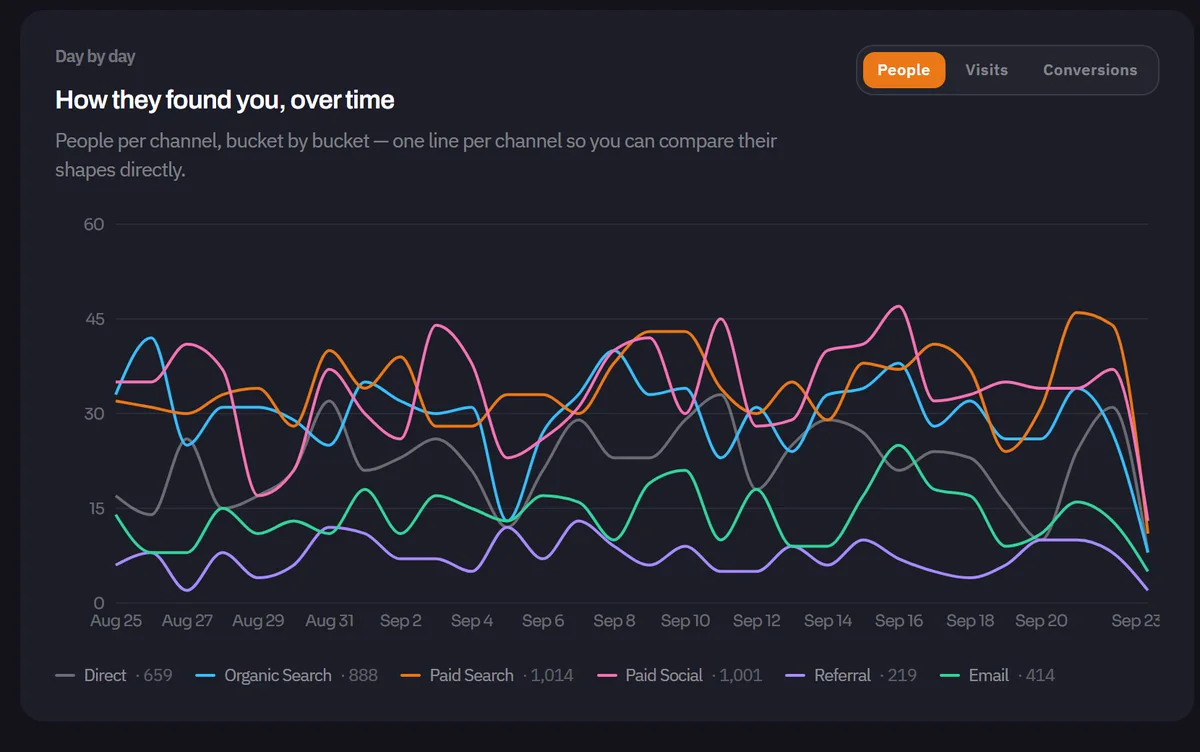
A chart of visits per channel over time

You ask

“Where do my customers come from?”

Find the channels worth more money.

Every channel, day by day, counted by people, visits, or sales. See which sources send buyers, not just clicks.

Why you need itFund the channels that bring buyers and stop paying for clicks that never convert.

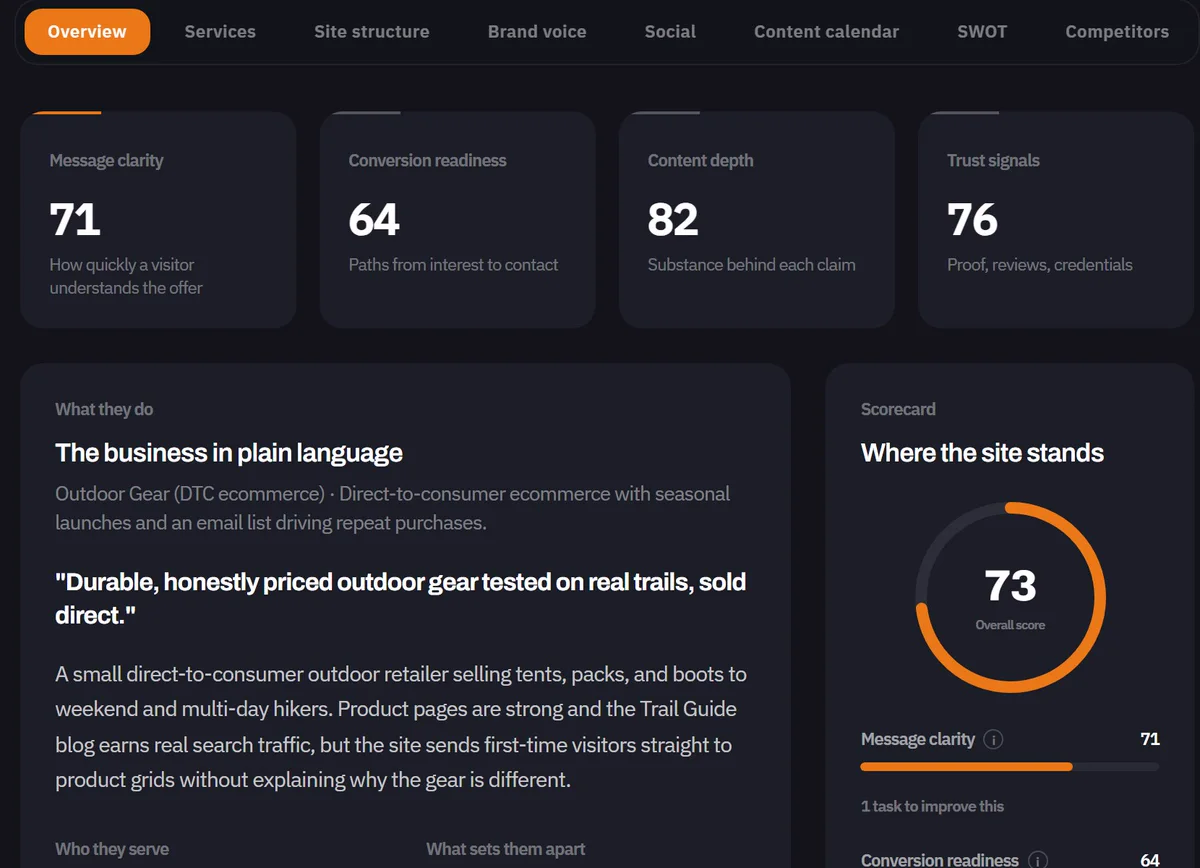
The AI site brief: four scores and a plain-language read of the business

You ask

“What should I fix on my website?”

We read your site so you do not have to.

We read your website and write a plain-language brief: what you do, who you serve, and where the site is strong or weak. Scored, saved, and compared next time.

Why you need itKnow what to fix first, instead of guessing.

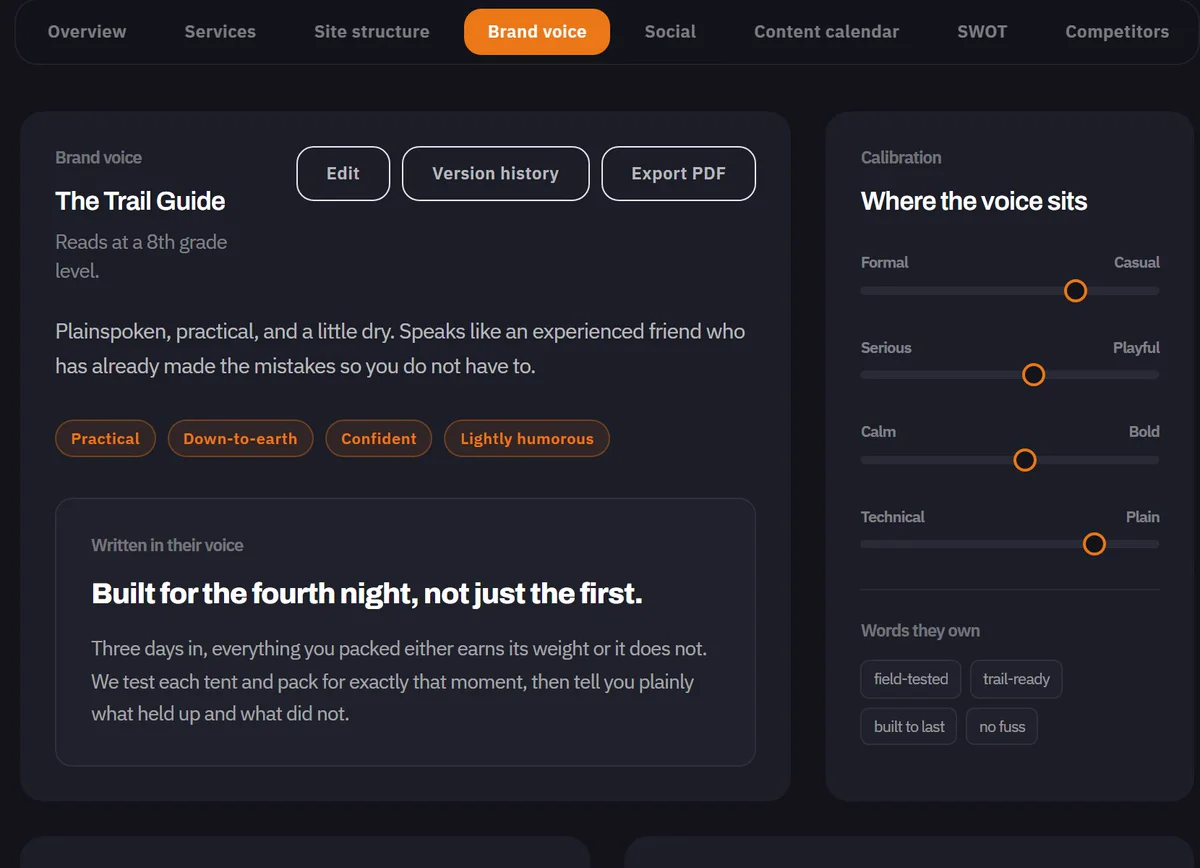
The brand voice guide: tone, calibration, and the words the brand owns

You ask

“Does our marketing sound like us?”

Every ad sounds like you.

We read your digital presence and turn it into a voice guide: your tone, the words you own, and what to avoid.

Why you need itHand any writer, freelancer, or agency one guide and keep your brand consistent.

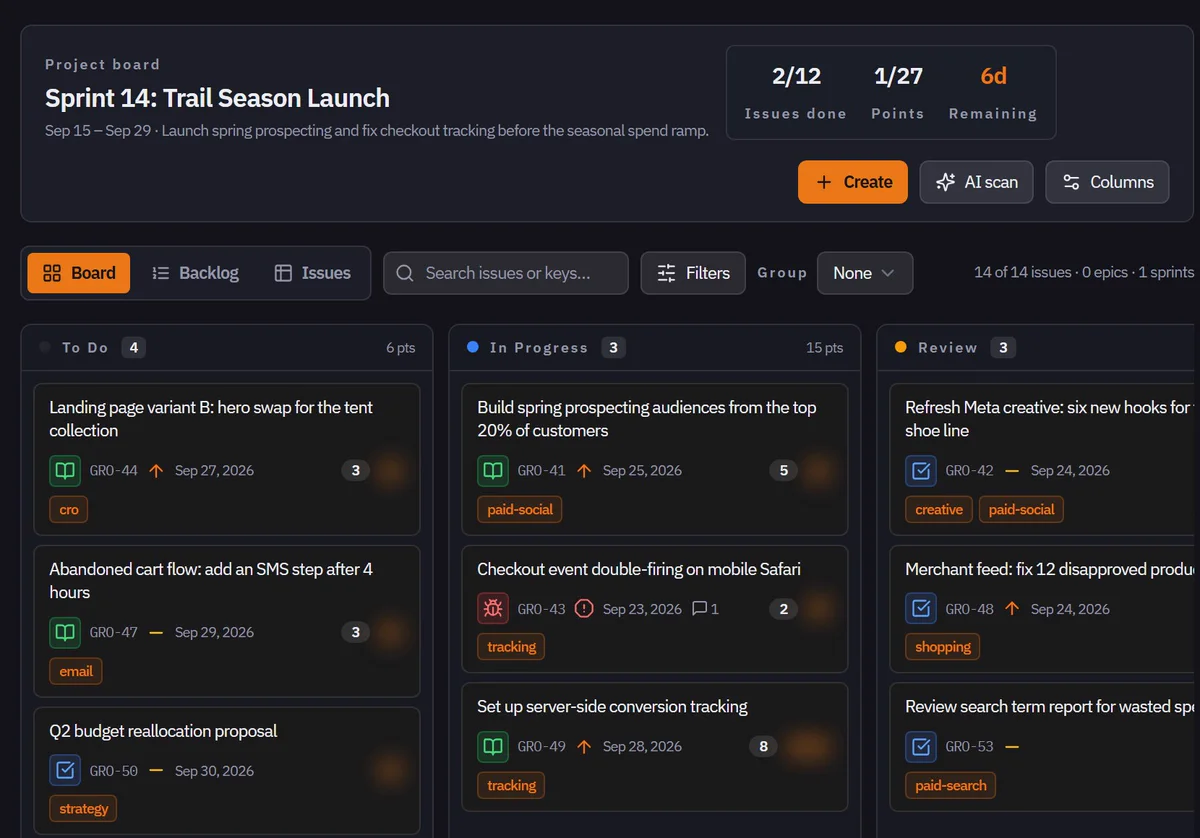
The project board for a two-week sprint

You ask

“What are you working on for me?”

See the work, not a status update.

Sprints, columns, owners, and due dates. If we are working on it, it is on the board, and you can open any card.

Why you need itStop asking for updates. Open the board and see what is moving and what is stuck.

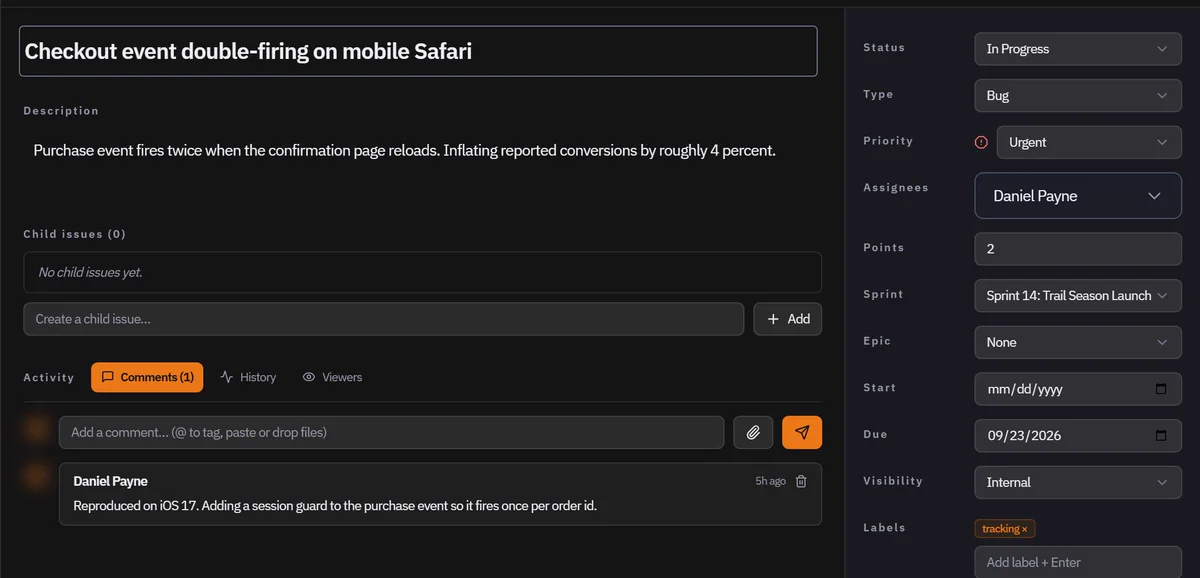
One task opened, showing its owner, due date, and comment thread

You ask

“What happens when something breaks?”

Even the bad news.

Open any task to read what broke, who is fixing it, and every comment along the way. In this sample, a tracking bug was inflating conversions by 4 percent. It is on the board, with an owner.

Why you need itTrust us because you can check us, including when something goes wrong.

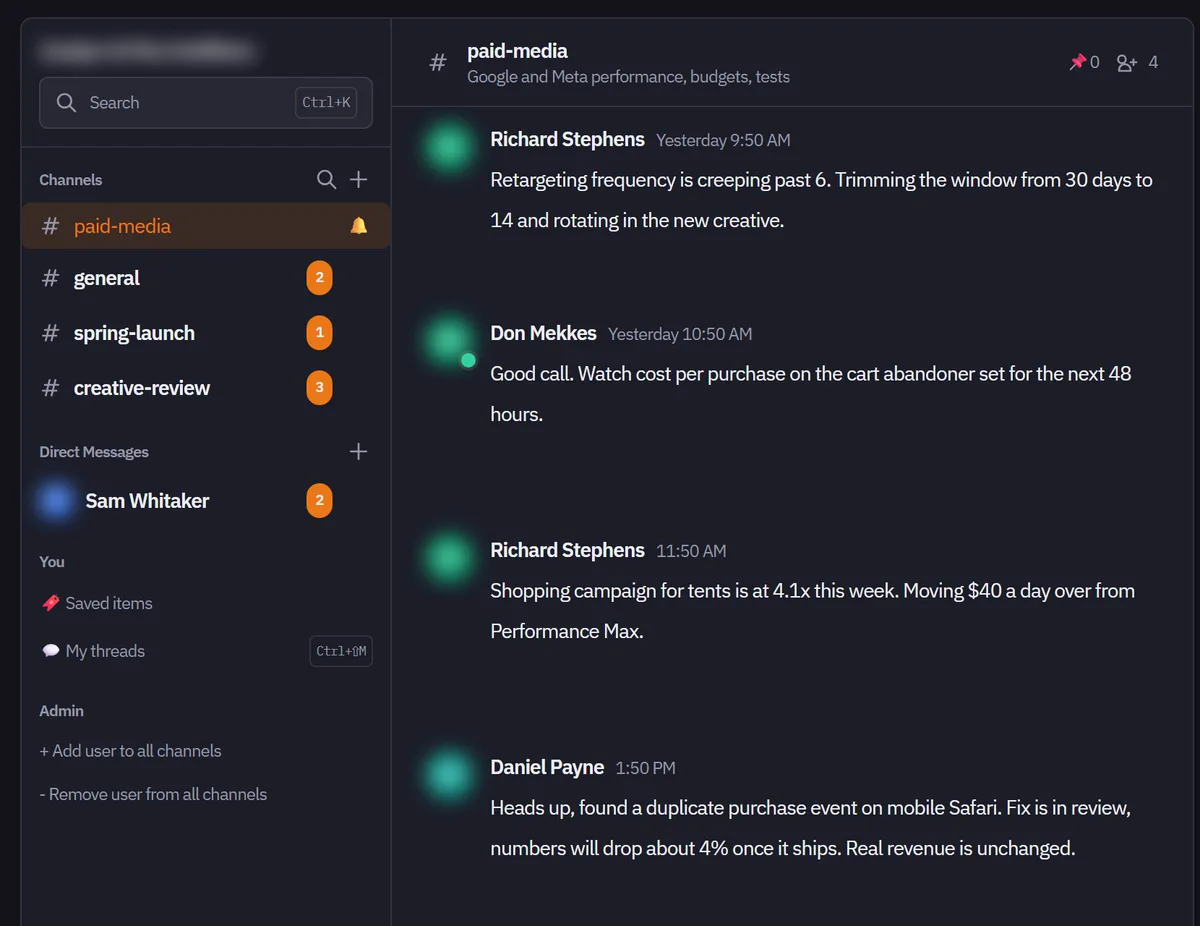
Team messaging with a channel list and an open thread

You ask

“Can I just ask someone?”

Ask the team, get an answer.

Channels for each project and direct messages for quick questions, next to the work, so context never gets lost in an inbox.

Why you need itGet an answer in the thread beside the work, not buried in an email chain.

Round 4 / The rest of the building

Still
more.

Those were the screens most owners open first. Behind the same login, there is more working for you.

  1. Dynamic Views

    Test headlines, offers, and layouts on your live site, shown to the right visitors, and see which one wins.

  2. Plain-language reports

    Generate a report that summarizes everything the Intelligence Brief has gathered on your business, in plain language.

  3. Meetings

    Video calls with the team, transcribed as they happen and summarized by the AI, so nothing said is lost.

  4. Campaign Studio

    Campaign ideas written from your brand profile, so they start on-brand instead of generic.

  5. Brand file and assets

    Your colors, fonts, logo, and creative files, kept in one place the whole team pulls from.

  6. Your ad accounts

    Google Ads, Meta Ads, GA4, Shopify, Klaviyo, LinkedIn Ads, and Merchant Center, each connected and readable in one login.

Round 5 / How it starts

Here is what happens after you say yes.

We learn about you.

We scan your marketing and digital presence to understand your strengths and weaknesses.

We put analytics on your site.

This helps you understand your visitors, what is working, and what needs to change.

You log in.

Your results, the brief, the board, and the team are already there.

Straight
answers.

What does it connect to?

Google Ads, Meta Ads, Google Analytics 4, Shopify, Klaviyo, LinkedIn Ads, and Google Merchant Center. We add more when your accounts call for it.

What does the AI actually do?

It reads your website and your tracking data and writes plain-language summaries: what is strong, what is weak, and what to fix first. Every summary is saved, so we can compare this month against last.

What are Dynamic Views and Dynamic Websites?

Dynamic Views are templates we place on your existing site for promotions, announcements, and conversion tests, with A/B testing and analytics. Dynamic Websites are full landing pages we build and deploy for you.

Can I see what the team is working on?

Yes. Every shared task shows who owns it, when it is due, and the full conversation behind it.

Final bell

See it with
your numbers.

Book a walkthrough and we will open the dashboard on your own accounts. No pitch deck.